support Click to see our new support page.
support For sales enquiry!

How to Set Customer Credit Limits in Odoo 19

Customer Credit Limits in Odoo 19 Banner Image

AkshayaMarch 19, 2026

Managing customer credit is one of the most critical aspects of financial control in any business. While offering credit helps improve customer relationships and drive sales, it also increases the risk of delayed payments and bad debts.

Without a proper system in place, outstanding balances can quickly get out of control — directly impacting your cash flow and operational stability.

Odoo 19 Accounting solves this with its Sales Credit Limit feature, allowing businesses to define, monitor, and control customer credit in real time.


What is Customer Credit Limit in Odoo 19?

The Customer Credit Limit in Odoo 19 allows businesses to set a maximum outstanding amount that a customer can owe at any given time.

Once this limit is reached or exceeded:

  • Odoo triggers a warning during sales or invoicing
  • Users can review the risk before proceeding
  • Businesses can decide whether to continue or restrict the transaction

This ensures better financial discipline without completely blocking sales operations.


Types of Credit Limits in Odoo 19

Odoo provides two levels of credit control:

1. Customer-Specific Credit Limit

  • Defined individually for each customer
  • Based on payment history and reliability
  • Overrides global settings

2. Global Credit Limit (Default)

  • Set at the company level
  • Applied automatically to customers without a custom limit

Important:

Customer-specific limits always take priority over global limits.


How to Set Customer Credit Limit in Odoo 19 (Step-by-Step)

Follow these steps to configure a credit limit for a specific customer:
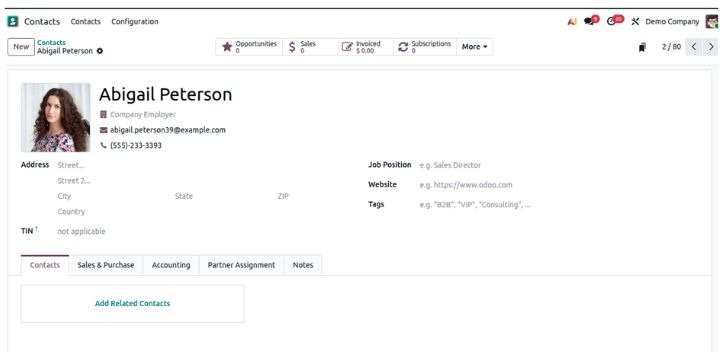
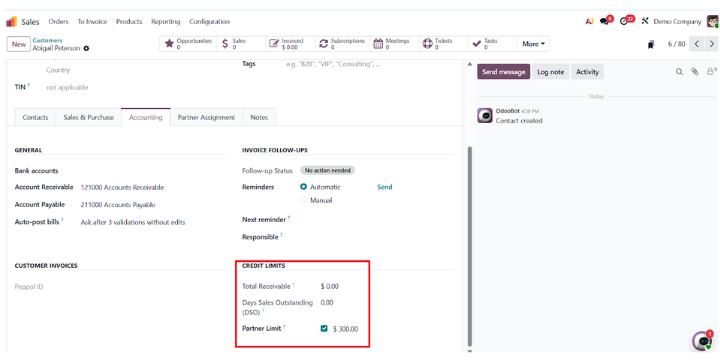
Step 1: Open Customer Record

  • Go to Contacts Module
  • Select the required customer


Step 2: Navigate to Accounting Tab

  • Open the Accounting tab
  • Locate the Credit Limit field


Step 3: Set Credit Limit

  • Enter the maximum allowed credit amount
  • Save the record


How to Configure Global Credit Limit in Odoo 19

To set a default credit limit for all customers:
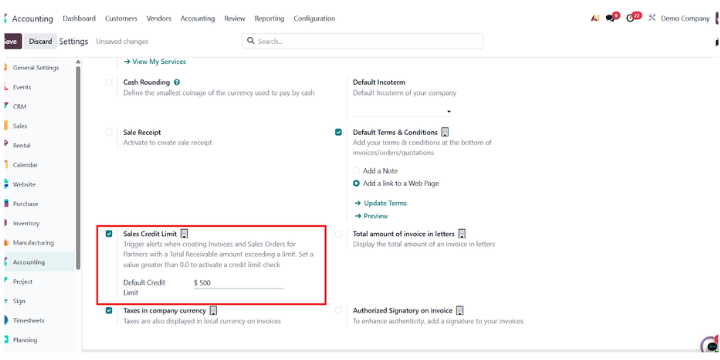
Step 1: Go to Accounting Settings

  • Navigate to:
    Accounting → Configuration → Settings

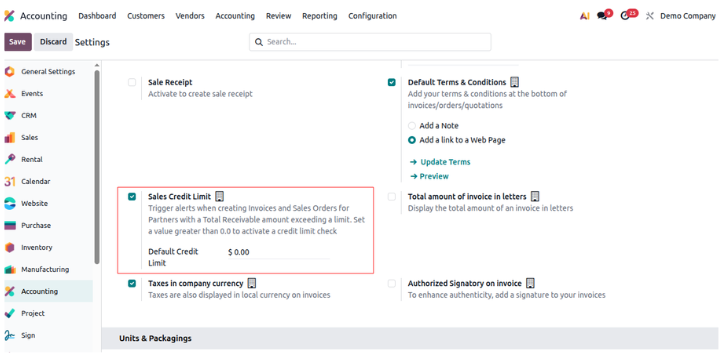
Step 2: Enable Sales Credit Limit

  • Find Customer Invoices section
  • Enable Sales Credit Limit


Step 3: Set Default Credit Limit

  • Enter a default value
  • Save the settings


What Happens When Credit Limit is Exceeded?

When a customer exceeds their credit limit:
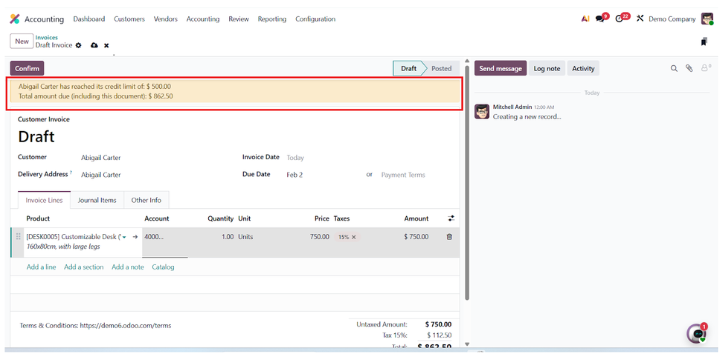
  • Odoo shows a real-time warning popup
  • Displays:
    • Current outstanding receivable
    • Defined credit limit


Important Behavior

Odoo does NOT block transactions by default.

Instead, it allows businesses to:

  • Proceed with trusted customers
  • Request advance or partial payment
  • Delay the order until dues are cleared

This flexibility is intentional — it balances risk control with business continuity.


Customer vs Global Credit Limit (Quick Comparison)
 

Feature

Customer Credit Limit

Global Credit Limit

Scope

Individual customer

Company-wide

Priority

High

Lower

Use Case

Risk-based control

Default fallback

Flexibility

High

Moderate


Best Practices for Managing Credit Limits in Odoo

If you just set limits and forget them, you’re doing it wrong.

Here’s what actually works:

1. Set Limits Based on Payment Behavior

Don’t assign random values. Use:

  • Payment history
  • Order frequency
  • Average invoice value

2. Review Credit Limits Periodically

Customer risk changes over time. Update limits accordingly.

3. Use Warnings Strategically

Don’t blindly approve overrides.
If sales teams ignore warnings, the system becomes useless.

4. Align Sales & Accounting Teams

  • Sales should understand credit exposure
  • Accounting should monitor receivables actively

This is where most companies fail.


Common Mistakes to Avoid

  • Setting very high limits → defeats the purpose
  • Not monitoring receivables regularly
  • Ignoring warning alerts
  • Not defining clear internal approval processes


Why Credit Limit Management Matters

Proper credit control helps you:

  • Maintain healthy cash flow
  • Reduce bad debts
  • Improve financial visibility
  • Build reliable customer relationships

Odoo 19 makes this process seamless by combining real-time tracking with flexible decision-making.


Need Help Setting Up Credit Control in Odoo?

Configuring credit limits is easy.
Setting the right strategy is not.

If you:

  • Don’t know what limits to assign
  • Want stricter controls (like blocking instead of warning)
  • Need custom workflows or approvals

Then you need proper implementation — not just configuration.

This is where experienced Odoo partners make the difference.


Final Thoughts

The Sales Credit Limit feature in Odoo 19 provides a strong balance between control and flexibility.

Instead of rigid restrictions, it gives businesses:

  • Real-time visibility
  • Smart warnings
  • Decision-making control

When used correctly, it becomes a powerful tool to protect cash flow while supporting sustainable growth.


0

Leave a Comment

Subscribe to our Newsletter

Sign up to receive more information about our latest offers & new product announcement and more.