Mohammad AfsahApril 28, 2026
You launch your Flutter app, tap a button, trigger an animation—and the UI stutters for a split second. The second time you run the same action, it feels smooth. That first hitch is frustrating, especially when you are trying to deliver a polished user experience.
This issue is often caused by flutter shader compilation jank, a common performance problem in mobile apps that use complex animations, transitions, or custom effects. It can make an otherwise fast app feel unfinished.
The good news: this problem is manageable. With the right optimization strategies, and with newer rendering improvements like Impeller, developers now have better ways to reduce or eliminate these stutters.
Shader compilation jank happens when the GPU needs to compile a shader during runtime, causing a short frame drop or lag.
A shader is a small GPU program used to render graphics such as:
When the app uses a shader for the first time, the device may compile it on demand. That compilation can block rendering briefly, resulting in visible lag.
If your app only lags the first time an effect appears, shader compilation is a likely cause.
Flutter renders frames using a graphics engine. Historically, many Flutter apps used Skia. When a new visual effect appears, the engine may need to prepare a shader for the GPU.
That process usually happens in this order:
Since mobile apps aim for 60 FPS (or 120 FPS on some devices), each frame has a tight deadline. If shader compilation pushes rendering past that deadline, jank appears.
This is one of the most common hidden flutter performance issues in animation-heavy apps.
The first time users open the app, common shaders may not be ready yet.
Effects like opacity changes, blur backgrounds, scaling cards, and hero animations can trigger shader work.
Moving between screens with custom transitions often introduces new shaders.
Budget phones with weaker GPUs are more likely to expose shader delays.
A proven way to fix flutter jank is warming up shaders before users interact with animations.
This means rendering common effects early so shaders compile in advance.
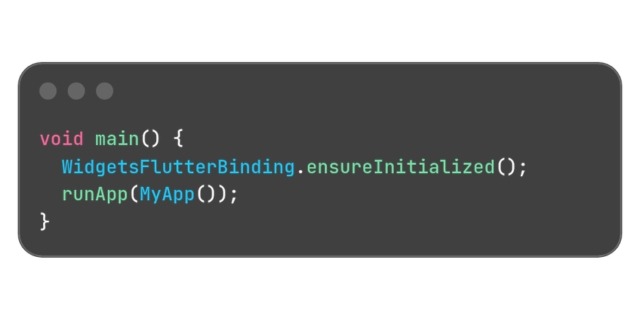 In production apps, warm-up is usually handled through performance profiling, preloading common animations, and startup rendering paths.
Search intent phrase developers often use: shader warm up flutter.
Not every animation needs expensive GPU effects.
Avoid overusing:
Use simpler visuals where possible. Fancy UI that stutters is worse than clean UI that feels fast.
If an animation appears on an important screen, trigger it off-screen or during idle moments first.
Example:
Use Flutter DevTools to inspect frame times and identify rendering spikes.
Don’t guess. Measure.
Impeller is Flutter’s newer rendering engine designed to improve graphics performance and reduce runtime shader compilation issues.
It was introduced to solve real-world problems developers faced with first-frame stutter and inconsistent rendering behavior.
This makes flutter impeller performance an important topic for teams building animation-rich apps.
Feature |
Skia |
Impeller |
|
Shader Compilation |
Often runtime |
More precompiled |
|
First Animation Smoothness |
Can stutter |
Better consistency |
|
Rendering Predictability |
Varies by device |
More stable |
|
Modern GPU Focus |
General-purpose |
Optimized for Flutter |
This does not mean Skia is bad. It means Impeller was built to address Flutter-specific rendering pain points.
No. Anyone claiming it is fully solved is oversimplifying the problem.
Impeller significantly reduces many common shader-related issues, but jank can still happen because of:
So yes, shader compilation pain is lower—but performance discipline still matters.
Do not overload startup screens with multiple animations and effects.
A flagship phone hides problems. Mid-range devices reveal them.
Use efficient state updates and limit unnecessary widget rebuilds.
Large uncompressed images can cause lag unrelated to shaders.
Users remember responsiveness more than shadows and blur layers.
Use profiling tools during development, not after complaints arrive.
Flutter shader compilation jank is a real issue that can damage user experience, especially during first-time animations and screen transitions. It usually happens when shaders compile during runtime and miss frame deadlines.
To reduce it:
And with Impeller, Flutter now has a stronger path toward smoother graphics rendering.





0