Nishma KVNov. 11, 2025
Have you noticed how almost every new app now includes an AI-powered feature—from chatbots to smart recommendations? Flutter developers are increasingly looking for ways to bring the same intelligence into their mobile and web apps. But how do you actually integrate AI or generative AI into a Flutter project without making it overly complex?
In this blog, we’ll explore practical ways to use AI and generative AI agents in Flutter apps, current trends shaping this space, and proven best practices to help you build smarter, more engaging experiences.
AI isn’t just for big tech companies anymore. With accessible APIs and open-source tools, developers can now easily bring AI capabilities like language understanding, image recognition, and text generation directly into their Flutter apps.
Some real-world examples include:
These use cases don’t just make apps smarter—they make them more useful and user-friendly.
Instead of building complex AI models from scratch, developers now rely on APIs like OpenAI, Google Gemini, or Hugging Face Inference API.
They offer plug-and-play AI services for:
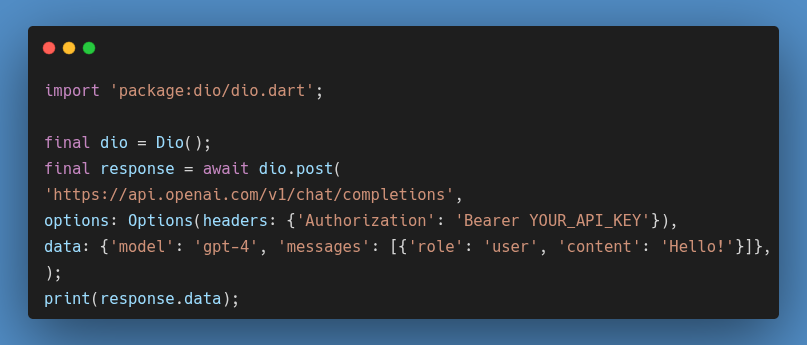
You can easily connect these APIs to your Flutter app using HTTP requests or libraries like dio
Thanks to frameworks like TensorFlow Lite and ML Kit, it’s now possible to run AI models directly on users’ devices.
This approach:
For example, a Flutter camera app can use ML Kit to detect objects in real-time without needing internet access.
Generative AI agents are evolving beyond simple chatbots. They can now perform specific tasks—writing emails, summarizing documents, or generating code—all within your Flutter app.
Developers often connect these agents using APIs and manage conversations through a state management solution (like Riverpod, Provider, or Bloc).
Let’s break it down step-by-step for beginners.
Decide what your app needs:
Most AI platforms require an API key.
Add it to your Flutter project safely using environment variables or the flutter_dotenv package.
Example:
Use Flutter’s built-in widgets like ListView and TextField to create a chat interface.
As users send messages, your app calls the AI API and displays responses.
Use a state management tool like Riverpod or Bloc to track loading states, user messages, and AI responses.
Also, handle API errors—users should see friendly messages if something goes wrong.
As on-device AI and open-source models get better, Flutter developers will have more freedom to integrate intelligent features without relying entirely on cloud APIs.
We’ll likely see more AI-driven UI customization, real-time translation, and context-aware assistants embedded in Flutter apps over the next few years.
Integrating AI and generative AI agents into Flutter apps is no longer a complex task reserved for experts. With today’s tools, anyone with Flutter experience can build intelligent features that make apps more interactive, useful, and engaging.
Start small—add a chatbot or a text summarizer—and grow from there.
What AI feature would you want to try building in your next Flutter app?
Use the OpenAI API and send POST requests using packages like http or dio . Parse the JSON response and display it in your app’s UI.
Yes. You can use TensorFlow Lite or ML Kit for on-device inference, which helps with speed and privacy.
Popular options include Bloc, Riverpod, and Provider. They help manage API states, messages, and responses cleanly.
Most offer limited free tiers but charge per request or token beyond that. Always check usage limits and pricing before launching.
Absolutely. Flutter’s cross-platform nature, combined with flexible plugin support, makes it an excellent choice for building modern AI-powered apps.





0