Muhammed Thamam MubarisFeb. 5, 2026
Every employee in Odoo is required to have a running contract in order to be paid. A contract outlines the terms of an employee's position, compensation, working hours, and any other relevant terms. Understanding how to create and manage these contracts properly ensures your team gets paid correctly and on time.
Employee contracts in Odoo 19 outline compensation details, working hours, and benefits. The system helps to stay organized by tracking contract statuses, sending renewal reminders, and keeping all employee documentation in one place.
Once you set up your first few contracts and templates, the process becomes straightforward and takes just minutes per employee. This guide will walk you through everything you need to know about employment contracts in Odoo 19.
An employment contract in Odoo is basically a digital agreement between you and your employee. It's an active record that connects to payroll, tracks important dates, and keeps everything about an employee's job terms in one spot.
Contract types in Odoo 19 include Permanent, Temporary, Seasonal, Full-Time, Intern, Student, Apprenticeship, Thesis, Statutory, and Employee options. Each type serves different hiring scenarios. For example, if you're bringing on summer help, you'd use a Seasonal contract. Hiring a college student for six months? That's where the Intern or Student contract type is used.
The contract stores key details like:
To set a contract for an employee, navigate to the Employee form and select the Payroll menu.
Creating a contract has changed from Odoo 18 to Odoo 19. It has been integrated on the Employee form itself instead of a separate view as demonstrated in the image below:
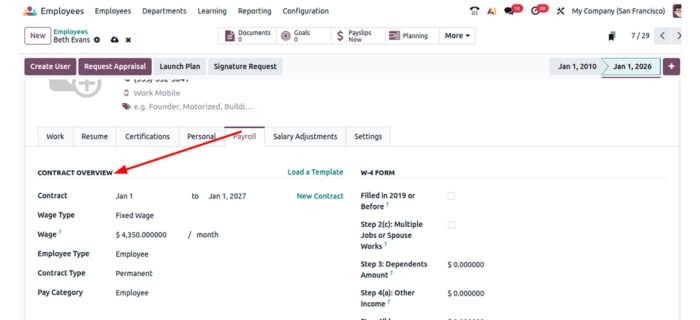
Contract : This is where you set the employee’s contract start and end date. Leaving the end date blank creates a permanent contract without an expiry date.
Wage Type: This is where you set if the wage is fixed or hourly. Fixed wages are usually used for permanent employees whereas Hourly wages are generally used for part time or seasonal employees.
Wage: This is where to set the employee’s gross wage and its frequency of payout such as Hourly, Weekly, Bi-weekly, Monthly,etc. s
Employee Type: This field specifies the broad classification of the employment relationship and often relates to salary structure types available in your Odoo configuration. Common options include Employee, Worker, Contractor, or region-specific classifications that align with local labor laws and tax regulations.
Contract Type: This field categorizes contract according to employment arrangement and organizational needs, with standard options including Permanent, Temporary, Seasonal, Full-Time, Part-Time, Intern, Student, Apprenticeship, Thesis, Statutory, and Employee.
Pay Category:This field defines the overall payment framework and payroll processing rules that apply to the employee's compensation structure. In localized versions like the United States Odoo setup, this field might show options such as "United States: Employee" which determines when payroll processes run, which default working schedule applies, and what work entry types are used for generating timesheets.
Work Entry Source: This field determines how Odoo automatically generates work entries for payroll calculations during each pay period, fundamentally affecting how employee hours are tracked and compensated.
Working Hours: Used to set working schedules which were configured in odoo such as 48 hours per week where an employee is expected to work 48 hours per week.
To Access contract templates, you can navigate to Employees app and Configuration > Contract Templates.
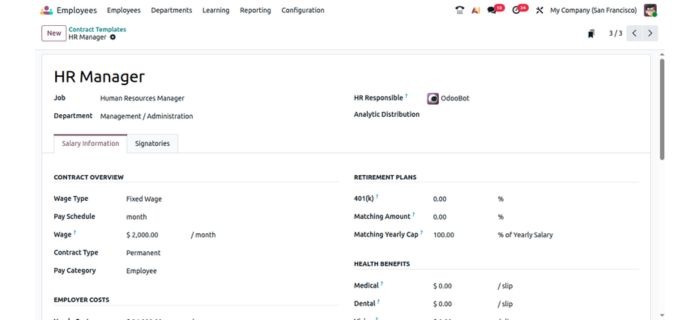
A contract template in Odoo 19 is a pre-configured blueprint that stores standard employment terms and settings for specific job positions or employee categories. Instead of manually entering the same information every time you hire someone for a similar role, you create a template once and reuse it whenever needed. This template can be selected on the contract we discussed above.
The screenshot shows an "HR Manager" contract template that includes predefined values like the job position (Human Resources Manager), department (Management / Administration), wage type (Fixed Wage), pay schedule (monthly), and contract type (Permanent). It also contains retirement plan configurations and health benefit details that would typically apply to this position.
Contract templates reduce administrative work by eliminating repetitive data entry. They also minimize errors that can occur when manually typing contract details multiple times. Most importantly, they ensure all employees in similar positions receive consistent terms, which is important for compliance and internal equity.
The template acts as your organization's approved standard for each position type, making it easier to maintain policies and ensure new contracts align with company guidelines and legal requirements.






0