Odoo Migration Checklist: What to Do Before, During & After
Muhamed YasirJan. 21, 2026
Odoo migration is not just a version upgrade. It is a high-risk technical operation that can either improve performance and scalability—or silently break your system if handled poorly.
Many businesses underestimate Odoo migration and treat it as a routine update. The result? Data loss, broken custom modules, downtime, and frustrated users.
This checklist is designed to help you plan, execute, and validate an Odoo migration the right way—based on real-world migration experience, not theory.
Why You Need a Structured Odoo Migration Checklist
An unplanned Odoo migration often leads to:
Incompatible custom modules
Missing or corrupted data
Broken third-party integrations
Performance issues after go-live
Increased cost due to rework
A structured checklist helps you:
Reduce migration risks
Control downtime
Ensure data accuracy
Validate system stability before users access it
If your Odoo setup includes customizations, integrations, or large databases, this checklist is not optional.
Pre-Migration Checklist (Before You Start)
This is the most critical phase. Most migration failures originate here.
1. Audit Your Current Odoo Environment
Document:
Current Odoo version
Installed standard modules
Custom modules and their purpose
Third-party apps and integrations
Number of companies, users, and databases
If you don’t know what you’re migrating to, you’ve already failed.
2. Identify Custom Modules and Dependencies
Custom modules are the number one risk in Odoo migration.
You must:
List all custom modules
Identify deprecated methods
Check ORM and API changes between versions
Verify module dependencies
Never assume custom code will “just work” in a newer version.
3. Review Database Size and Data Quality
Check:
Database size
Duplicate or invalid records
Legacy data that is no longer required
Migrating bad data only creates bigger problems in the new version.
4. Freeze Development Activities
Before migration:
Stop new feature development
Pause module changes
Lock production data (if possible)
Migrating a moving system leads to inconsistencies.
5. Define Migration Scope Clearly
Decide upfront:
Target Odoo version
Apps/modules to migrate
Companies and users
Integrations to retain or replace
Scope creep is a silent budget killer.
6. Create a Backup Strategy
Take:
Full database backup
Filestore backup
Configuration files backup
Never rely on a single backup. Test restoration before migration.
7. Choose the Right Migration Approach
Common options:
OpenUpgrade-based migration
Custom migration scripts
Partial re-implementation
The “cheapest” option is rarely the safest.
8. Prepare a Staging Environment
Never migrate directly on production. Set up:
Staging server
Test database
Version-specific environment
This is where mistakes should happen—not in live systems.
Migration Execution Checklist (During Migration)
This phase requires technical discipline and documentation.
1. Perform Test Migration First
Start with:
Core database migration
Standard modules
Minimal data set
Expect errors. That’s normal. Ignoring them is not.
2. Handle Custom Modules Carefully
During migration:
Refactor deprecated code
Update API calls
Fix ORM changes
Resolve dependency conflicts
Each custom module must be tested independently.
3. Migrate Data Incrementally
Avoid big-bang migrations when possible. Validate:
Customers
Products
Accounting entries
Inventory
Sales and purchase records
Data validation should happen after every major step.
4. Validate Third-Party Integrations
Check:
Payment gateways
Shipping APIs
External accounting tools
BI or reporting tools
Many integrations silently break after version upgrades.
5. Log and Document All Issues
Maintain:
Error logs
Fix history
Migration notes
This documentation saves time during future upgrades.
Post-Migration Checklist (After Go-Live)
This is where many teams relax—and regret it later.
1. Functional Testing Across All Apps
Test:
Sales workflows
Purchase flows
Inventory movements
Accounting processes
Automation rules
If users find bugs before you do, trust is already lost.
2. User Acceptance Testing (UAT)
Involve:
Department heads
Key users
Operational staff
Technical success means nothing if users can’t work efficiently.
3. Data Reconciliation and Validation
Verify:
Opening balances
Stock quantities
Historical transactions
Reports and dashboards
Small data mismatches can create massive accounting issues later.
4. Performance Optimization
Check:
Page load times
Report generation speed
Database query performance
New versions are not automatically faster without tuning.
5. Security and Access Review
Revalidate:
User roles
Access rights
Record rules
Sensitive data visibility
Migration can unintentionally expose data.
6. User Training and Documentation
Even minor UI changes confuse users. Provide:
Short training sessions
Updated documentation
Internal SOPs
Adoption is part of migration success.
7. Post-Migration Monitoring and Support
Plan:
Hypercare support window
Error monitoring
Performance tracking
Migration doesn’t end on go-live day.
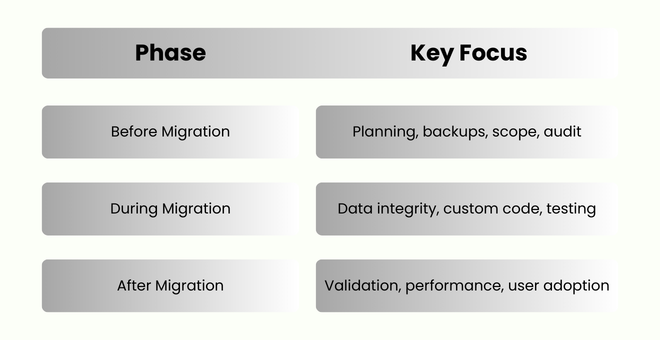
Simple Odoo Migration Checklist Summary
Do You Need an Odoo Migration Expert?
Be honest with yourself:
Small, standard setup with no custom modules? You may attempt a DIY migration.
Custom modules, integrations, large databases, or multi-company setup? You need professional Odoo migration service.
A failed migration costs far more than doing it right the first time.
If you are planning an Odoo version upgrade and want zero data loss,minimal downtime, and long-term stability, working with an experienced Odoo migration team is not optional—it’s a business decision.
Final Thoughts
Odoo migration is not about moving data from one version to another. It’s about preserving business continuity while upgrading your system foundation.
Use this checklist seriously. If you skip steps, Odoo won’t forgive you.





0